What's new
Pokémon Blaze Online

Welcome to the official forum for Pokemon Blaze Online. By joining, you gain the ability to post topics, engage in discussions, and access exclusive content. Ready to start your adventure? Download the game and embark on your journey. Register today and connect with a global community of players.

Event: Battle UI Rework

Status
Not open for further replies.
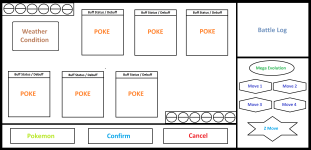
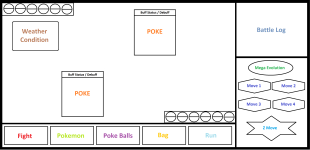
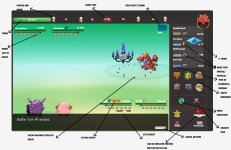
As I have little free time, I created a sketch without many details of what I think a complete interface would look like, but simple and easy to understand, a PVE version for when encountering wild pokemons or battles against NPCs, with an additional shortcut exclusive to poke ball, where only the pokeballs you have appear and not the other items in the Bag, potions and other items would be accessed through the Bag in this interface, i almost forgot e_e , when the pokemon, poke ball or bag option is selected, it would open a tab showing your pokemons/pokeballs/bag where the pokemon's moves are, on the right side of the interface, similar to how it is in the current interface

Version for PVP where they would have the option to confirm your action after you click in a move or a pokemon to switch, and cancel action for when you click on the wrong move or choose the wrong pokemon to use, then before clicking confirm you cancel your action, re-select and then confirm action.
 

Attachments

  • 00000.png
    00000.png
    150.2 KB · Views: 710
  • 00001.png
    00001.png
    162.1 KB · Views: 724
Hey everyone, amazing submissions so far. Wish you all good luck!

I also wanted to participate in this event. Here is my entry;
I went with red as the theme of this design, as our game is called pokemon "blaze"online afterall. I wanted the theme to match our game's name.
This theme focused on making the battle UI simple, clean,and easy to understand for all users. Which I believe is a very important aspect.

eHaT4d6.jpeg


This is with the bag or pokemon option opened.
a9qb56P.jpg


This is with the bag/pokemon option closed.
cIoOben.jpg


The weather/Field surge will be shown on the top right of the batttle screen, inside the grey highlighted rectangle box.

I wanted to also add some sort of customization, to make it easier to toggle battle animations so, I have added that as an option on the left side of the UI, the bottom button. (This can be deleted if you don't like it)
Above that button is the amount of total turns that have taken place during the battle.
And finally, the top button is the current time that remains for the current turn.

The preview circle with the pokemon's inside is the button to indicate the current's pokemon turn. This will help simplify which pokemon is at turn for 2v2 or 3v3.

The Name VS. Pokemon at the very top is the title indicating who you're battling. If you're against a player, it will show You Vs Player . Or If you're against a pokemon, it will show vs pokemon.
Another option for that is, the pokemon's name or players name as well. But that's up to sneks.

This one includes field surge, and weather
U1B5StYilYzUmYg_1695665421.jpeg

Thanks for taking a look at my entry, and i truly hope you consider it.
Warm regards.

:roll:
 
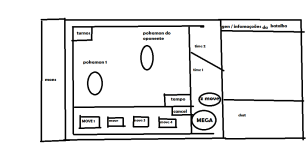
My idea is just for pvp, but you can adapt this battle mode that I sketched out for pve too, I hope you like it haha
file:///C:/Users/User/Pictures/PBO-UI%20BATALHAS,%20EVENTO.png
 
My idea is just for pvp, but you can adapt this battle mode that I sketched out for pve too, I hope you like it haha


Attachments

  • PBO-UI BATALHAS, EVENTO.png
    PBO-UI BATALHAS, EVENTO.png
    21.8 KB · Views: 665
Hi everyone,

This is my entry for the Battle UI rework Event. I tried to keep the current UI color scheme and features; and reorganize some of the standard Battle attributes. The goal is to have a wider interface so it could be mobile-friendly.
cTfQmml.png

tshP2Of.png

The first two pictures show how a 3v3 battle will look, it's very similar to Showdown's interface, to be honest :D
-Battle log to the right side, Movesets at the bottom along with Z-Move, Mega Evolution, and cancel button. (Side note: As Mega Evolution and Z-move don’t occur at the same time, we could also use the same Mega Evolution button slot to display the Z-Move button using its icon, just like you can see in the following picture below)
- At the very top, we can see the Opponent Team preview next to the players’ names. We can visualize the Opponent Team info by hovering over the Pokemon Icon on top, or the Pokemon in the battle screen (or by a single click if playing mobile). The Hover Pokemon info screen will be updated with the already used moves and their total amount of PP.
- Run and Bag icons will remain the same at the bottom right side for quick access.
- The Battle timer and move timer information were moved to the bottom side as well, to keep all the important information close to one another.
RGeTV9O.png


Team Preview Window
GJ1TmZ0.png

MbEYslJ.png

These two pictures above show one of the major changes in the UI:
- The Pokemon Team Preview and "Fight" icons were relocated on the left side, so to access Team Preview or switch Pokemon, we must click on the green Poke Ball icon at the bottom left side, and it will display a new window with an overall view of the whole team move-sets. During the 3v3 battle, the current Pokemon, will be focused (highlighted) in the Team preview icon and the battle screen as well.
- When Bag is open it will overlap the Battle Log for a wider view. A single column list item view with the complete item name could avoid using the wrong item, for example using a Poke ball instead of the Competition Ball during fishing competitions.
alGrXtD.png

The last image shows a 1v1 battle. In this case, the team preview window will also indicate the most effective movement against the opponent. And finally, the weather conditions will be displayed at the bottom right side, above the Move timer icon.

Click in the next link if you want to see a short video https://youtu.be/2SFSoHERMZo
By the way...I want to thank fpabl0, Yaosek, and Prophet for all the advice and suggestions. I couldn't have done it without them as I have zero acknowledge of pvp battles and what's needed. Your help made all the difference. This definitely was Team work.
 
God said:
Hey everyone, amazing submissions so far. Wish you all good luck!

I also wanted to participate in this event. Here is my entry;
I went with red as the theme of this design, as our game is called pokemon "blaze"online afterall. I wanted the theme to match our game's name.
This theme focused on making the battle UI simple, clean,and easy to understand for all users. Which I believe is a very important aspect.
Hi. I wanted to submit a 2nd entry with an updated version one.
Thanks 🙏🥰
the description for it is in the first post.
gFo8a0vLEJiQ71n_1695997076.jpeg

s6h0WUb63Axj9ku_1695997076.jpeg

aQoERe764y3MEwD_1695997076.jpeg
 
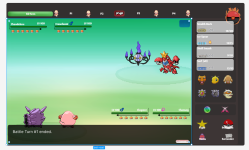
Hi, slight more details and changes for battle UI
 

Attachments

  • Captura de pantalla 2023-10-01 184203.png
    Captura de pantalla 2023-10-01 184203.png
    223.7 KB · Views: 537
  • ui.jpg
    ui.jpg
    236.2 KB · Views: 488
Arkant0s96 said:
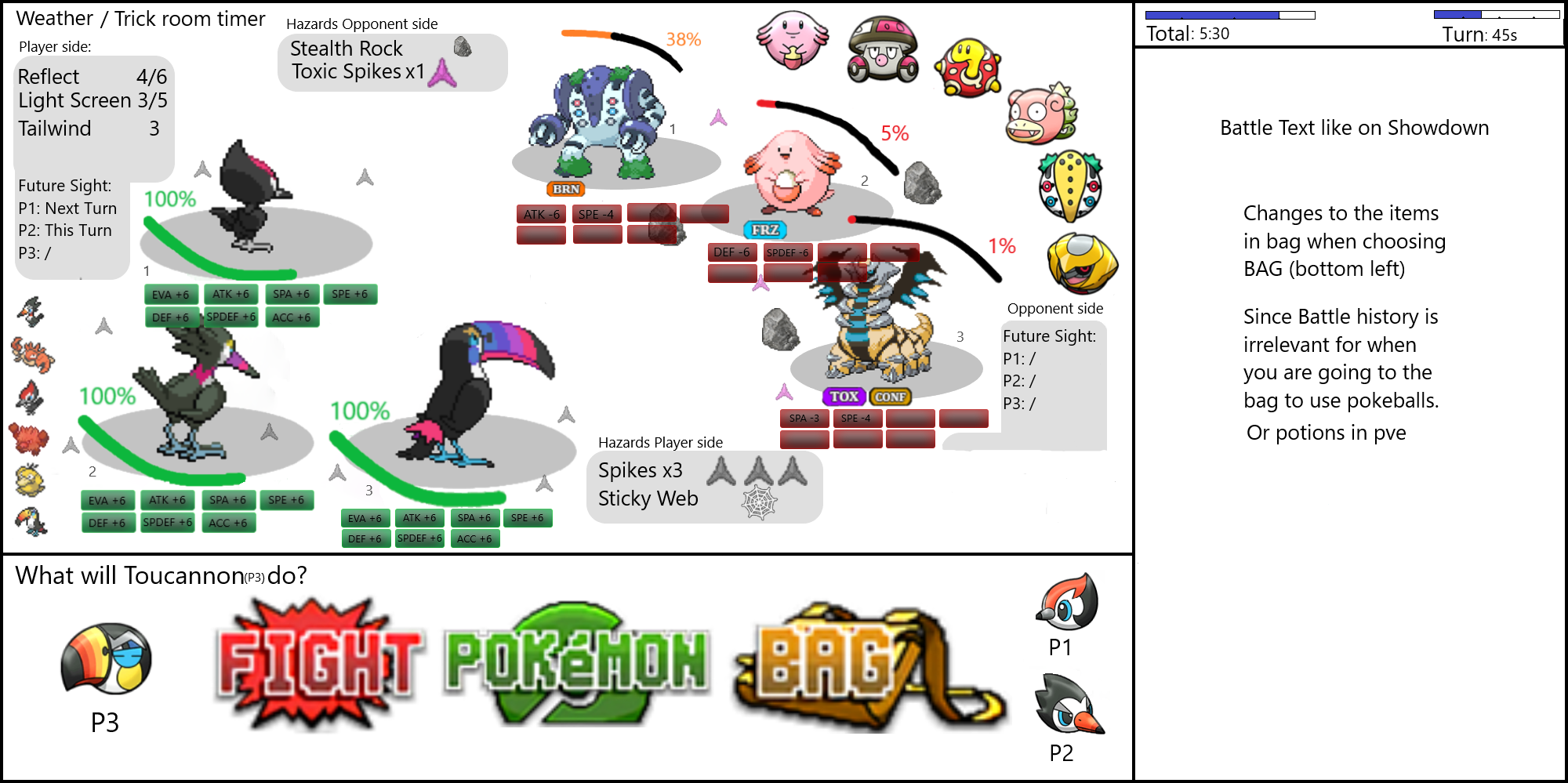
The battle starts on this screen:

https://i.gyazo.com/dc361aeba0fb1061b02f52bb939c7b14.png

You can already see what happens when clicking bag (battle chat changes to bag resulting into similar to what we have now)

If you click Move Button, screen turns into:

https://i.gyazo.com/c5fceb273c175d54a44d0a04f25436d2.png


If you pick switch button (switching to other pokemon from team):

https://i.gyazo.com/ee52c862bb49055dd9bec73e1b49c05e.png


If I end up having the time, I'll remake it with some added in icons & pokemon already. Kind of feels messy cuz of the amount of explanation i did on the pictures.


EDIT: Apparently the BB code isn't working & dont see a way to add attachments like the previous entries have :S
Sadly didnt have the time to touch up the abstract images above used more:

  • Start of turn (triples) battle:
4e05d58432cc110eb2ff954382b0acdb.png


Mainly note the full team preview on the battlescreen rather than in text.

Tried working with an elliptic format with a 'diagonal' line separating player & opponent side. Adding a bit more dynamic rather than just having straight lines on the battle screen.
Overlapping issues can easily be fixed by making the chat screen a bit slimmer, but didnt have the time to adjust once i noticed the stat stage overlap.

Numbering the slots the pokemon stand on was needed for me to be on screen aswell, to make sure all goes as you plan (and you don't accidentally switch in a pokemon on the wrong pokemon slot or smth)

The lack of background is because I honestly love our current backgrounds we have, so I preferred to have this rework mainly to be about User Interface, rather than Art.

Bottom part of screen showing which pokemon you are currently deciding what to do, clicking the other pokemon (pikipek & trumbeak in the picture) will switch to what that pokemon (or pokemon slot) should do.

I decided to remove Run on this example, because I assumed wild spawns would never be 3v3 format & thus the icons of the other pokemon slots can be changed into our current run icon.

These pictures were made before the forfeit suggestion came up in discord & I'm gonna be honest, never crossed my mind until then to add it here. However, does make sense to me to have the forfeit button on the bottom right (under the battle text).

Choosing bag (as typed on the picture) would change the battle text into our inventory. Didnt really see any fault in our current inventory system & it only being pve usable, i just ignored to add this in picture :) .

Hovering over the opponent's team preview will show their remaining hp %, their status conditions (if any) & used moves (ngl used moves also only occurred to me to add after suggested by others before me), aswell as their names, types & possible abilities [the full stat range can be added aswell, but dont rly want to bomb it with too many numbers].
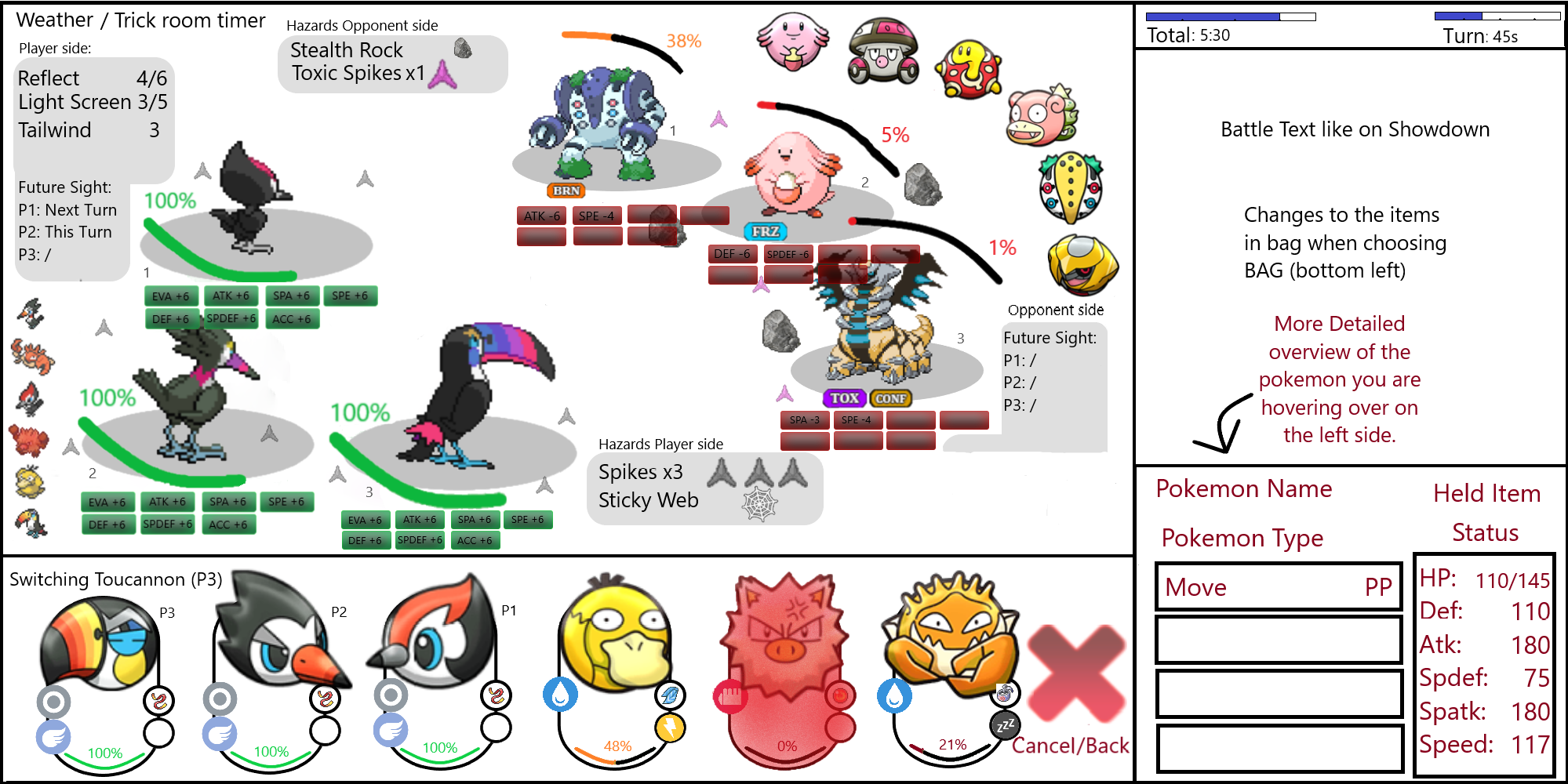
Wanted to add a small picture of this hover overscreen aswel but again, didnt have the time/feel for it past couple weeks, this would show up bottom right (same position it will in next picture for your own pokemon after choosing switch).

  • Choosing Pokemon/switch:
fd44986e7eb85d8edeb822c0af5a69a1.png


As you can see, this shows your entire team, their typing, their held item, their hp left & their status. When hovering over one of them, detailed info appears on right side (hover can be adjusted to be 1 click & only actually selecting a pokemon to switch would require 2 clicks, this to help mobile users, hover is a pain on my mobile :D ).

Primeape is shaded red because that pokemon is already fainted. Also why its shaded red on the left side of the battle screen.

Not gonna lie, im most proud of my switch UI :P .

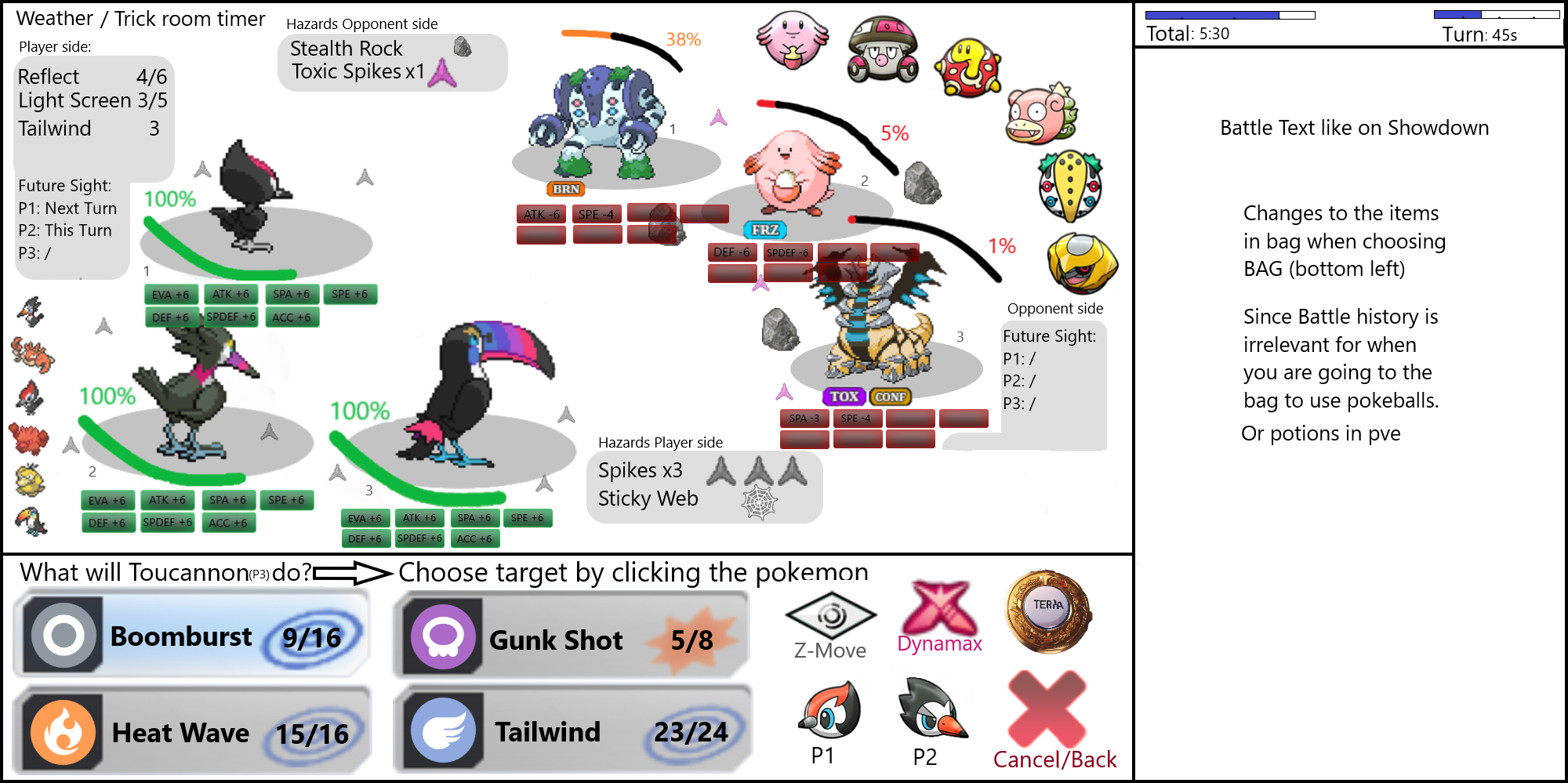
  • Choosing Fight/move:
94259a81f1bcab972c7d40c7787c6bfb.png


Not really sure what needs further explaining than what's shown on screen (the weird icon next to dynamax is terrastallize, ai art couldn't make anything better than that but again, i mainly wanted to focus on the user interface, not as much on the actual art of it)

Z-move icon would change into Mega icon when applicable. Both can be on same spot because both require you to hold a specific item (z-items or mega stones).

'*Arrow* Choose target by clicking opponent pokemon' wouldnt actually show in the screen permanently (a choose target prompt can be made like how you get a prompt [already implemented in-game] on what pokemon from team you want to use item on while not in battle)

Optional extra detailed information of the move you clicked once/hover over (again i prefer clicking twice to actually pick a move for mobile players) can be added on the bottom right part again.


Am a bit bummed myself I couldn't fully finish it the way I wanted to (let alone add doubles & singles format pictures). But still happy enough to submit it :) .


TLDR:
  • Elliptic battle screen with diagonal player-opponent split => more dynamic than straight lines
  • Numbered pokemon slots
  • Team preview in battle screen
  • Overlap issues can be fixed by making battle text a bit slimmer
  • Pokemon summaries on Switching
  • Focused mainly on the UI side, not on the Art/colouring side


Hope everyone had fun thinking of a UI overhaul.

PS: i'm sorry all dark mode users, didnt realize the pictures would show this huge here :D
 
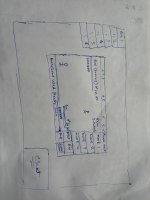
firstly sorry for my poor drawing skill ,my bad handwriting and bad English.
onto the topic , I want to share my idea this design is good i think cause its small battle screen can be good for mobile users .
let me explain the design - battle interface firstly we can see in the upper side of the battle box is the name of the players(also like player name vs npc name) then right side of it is the please wait message it's suppose to be the turn message, then in the battle screen the two stick figures suppose to be Pokemon the enemy name is in the upper left corner with the health bar below it and below it is the number of Pokemon opponent has (pokeball logos ) .then in the upper right corner is the terrain status, in the down left corner is player's Pokemon and right to is same as opponent Pokemon names and etc. the battle chat or battle dialogue is in the below it's suppose to only show the last dialogue but in the right upper corner there is small arrow type thing that will extend it's window and show the past dialogues.
now to the right of the battle box is moves down to it has buttons of fight, Pokemon,bag and surrender (if encounter it should say Run) that's it also I think substitute is mot visible perfectly if a Pokemon use substitute only the doll should be visible and the Pokemon should visible as a transparent thing and also the spikes , stealth rock should be seen in the below of the health bar of Pokemon as a symbol also the ground thing.
anyways in mobile it's really hard to see with the massive Pokemon line-up thing at the top it should be like in the left corner .
reply if you guys have any doubt about the drawing (design lol)
IGN-DipBachar
Discord-thanegarballs
 

Attachments

  • IMG20231015203942.jpg
    IMG20231015203942.jpg
    2.2 MB · Views: 426
Status
Not open for further replies.
Back
Top