What's new
Pokémon Blaze Online

Welcome to the official forum for Pokemon Blaze Online. By joining, you gain the ability to post topics, engage in discussions, and access exclusive content. Ready to start your adventure? Download the game and embark on your journey. Register today and connect with a global community of players.

Event: Battle UI Rework

Status
Not open for further replies.

Snakes

Administrator
Staff member
In our endeavor to enhance Pokemon Blaze Online, I am currently exploring the possibility of revamping various aspects of the user interface, which includes, but is not limited to, Party Icons, the Box, Chat Box, and Battle UI. My initial focus will be on revamping the Battle UI in the near future. As most of us are aware, the current Battle UI is somewhat cumbersome and doesn't provide an optimal user experience. Considering the integration of Showdown in the future, it's crucial to initiate improvements to the Battle UI well in advance.

At present, we lack a dedicated UI artist, which is why I encourage all of you to participate and contribute your ideas to the design. I'd like to adopt an approach similar to what PRO did, which I found quite effective: turning this into an event. Allow me to explain how this will work.

Everyone is welcome to create a new Battle UI, whether it's a redesign of the existing one or an entirely new concept. You can use tools like Pen & Paper, Photoshop, Paint, or any other medium that allows you to convey your ideas effectively to the playerbase. If your UI redesign is selected and approved by PBO, you will be rewarded generously. You will have the opportunity to choose a Shiny Pokemon of your preference, with the nature of your choice. Abilities and IVs will be automatically generated. The selected Pokemon must be currently obtainable by all players and should not be a Legendary. For instance, it can be a Shiny Charmander or a Shiny Dreepy – the choice is entirely yours. Now that we've discussed the rewards, let's establish the rules for redesigning the Battle UI:

- The redesigned UI should adhere to standard Battle attributes.
- It should provide sufficient space for 2v2 and 3v3 battles, as there is a high likelihood of us having such battles following the integration of Showdown.
- The UI should incorporate buttons for Mega Evolutions, Z-Moves, and Move Cancellation (note that Cancellation functionality is not currently operational but will be implemented post-Showdown).
- It should include indicators for stat boosts, status effects, weather conditions, and all other elements necessary for a comprehensive battle UI.

Please keep in mind that if none of the submitted designs are implemented, there won't be any rewards distributed.

I will unlock this post in a few days for you to submit your designs. Please refrain from posting anything other than your Battle UI design, including feedback. Your submission should include a complete description of the design.

Lastly, please be aware that if your Battle UI is chosen, you will need to grant PBO permission to use your design.

I wish all of you the best of luck and am eagerly anticipating some outstanding designs.

Thank you,
Snakes
 
Heyo,

hope you like it.
The status and buffs/debuffs can be on the pokes. And if you hover with your mouse on it you can see the stats.
Mega Evo and Z Move are clickable.
Weather Status and Screens is justa text how long it will last.


Peace BADT
 

Attachments

  • image.png
    image.png
    29.6 KB · Views: 1,622
  • 2023-09-16 14_12_48-Pokemon Blaze Online.png
    2023-09-16 14_12_48-Pokemon Blaze Online.png
    128.4 KB · Views: 1,480
Hello, Sorry if the picture is too small the size restriction makes it harder and also sorry if its a bit scuffed cus i did it on mac which has no MS paint.

EXPLAINATATION:

So as you can see is the classic pokemon battle ui but a bit changed
The 2 circle buttons beside the moves of the pokemon can be clicked to view other pokemon or open ur bag which shows potions and pokeballs, this will be placed the same way as your moves are but will be replaced by pokemon names and icons of the pokemon when the Pokeball icon is clicked and potions, pokeballs and their icons when the Bag icon is clicked. Lastly the Shoe Icon Is for running away from the pokemon encounter.

The pp will be replaced by the number of potions when the Bag iconis clicked or when the Pokeball iconis clicked it will change to the percentage of health the pokemon has which you want to swap to.

The pokeballs above the names of the pokemon represent the number of pokemons you and ur opponent have in your party, if a pokemon is knocked it will show a grey pokeball.

Now for the area under the pokemon which shows the dmg and what move the pokemon used its pretty simple. Its a scrollable list which shows what move you used, how much damage it did and if the opposing pokemon fainted or not.

Now for the background it can change based on weather and where you are on the map or for OU it can have like selections of few maps (kind of like pokemon showdown)

For Mega evolutions their can be a seperate icon like the ones for opening bag, but this icon is the pokemons mega evolution stone icon and it can be placed beside the move list (Kind of like how their is a Dynamax button to dynamax your pokemons in pokemon sword/shield)

THATS ALL! THANK YOU!!
 

Attachments

  • Screenshot 2023-09-16 at 10.14.20 PM.png
    Screenshot 2023-09-16 at 10.14.20 PM.png
    168.5 KB · Views: 1,424
Ok everyone: Here´s my idea.
The first thing I´ve been thinking is the colours, maybe if we use the "blaze colors" could be a good idea, so the rightoff board and icons now have variations of red, orange and yellow, like "bag, pokemon, fight and run" icons.

The board of what happens in battle now stay in rightoff position, to make easy to saw what happened. The moves of pokes now stay under the battle, with fight-bag-pokemon-run icons. Just like Z-moves and Mega evolution.

I think in PVP battles like ladder and Crew wars, a Poke stadium could be the background, to create increase the experience of real battles.

This is a example of double battle, but single keep the same idea.

Hope you all like =D!
 

Attachments

  • UI ZZZero.jpg
    UI ZZZero.jpg
    103.2 KB · Views: 1,469
Hellooo everyone!

Lets give this a go' shall we :P
Sorry for the - not so creative way of modelling - but hope you like the idea of it!

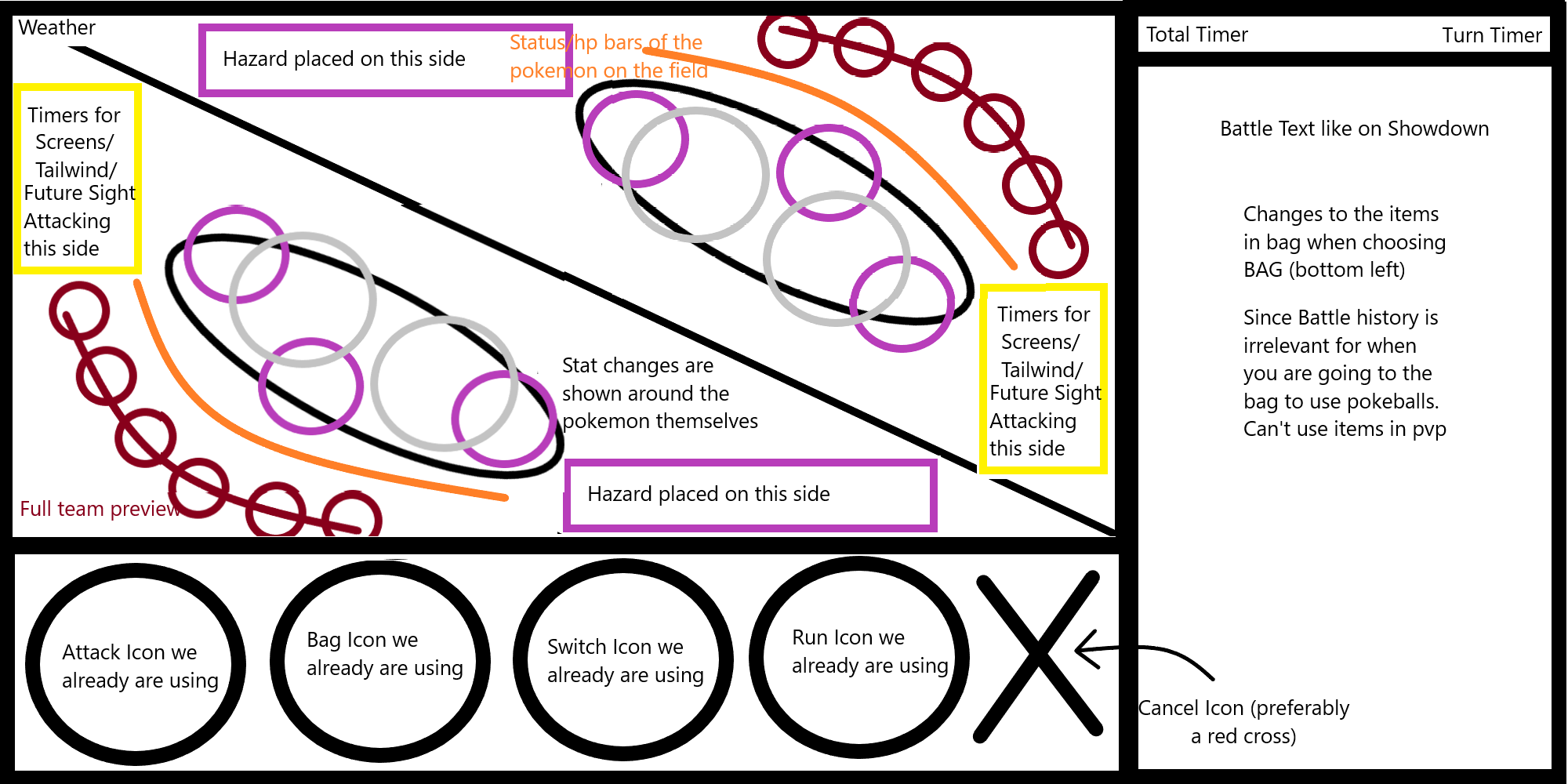
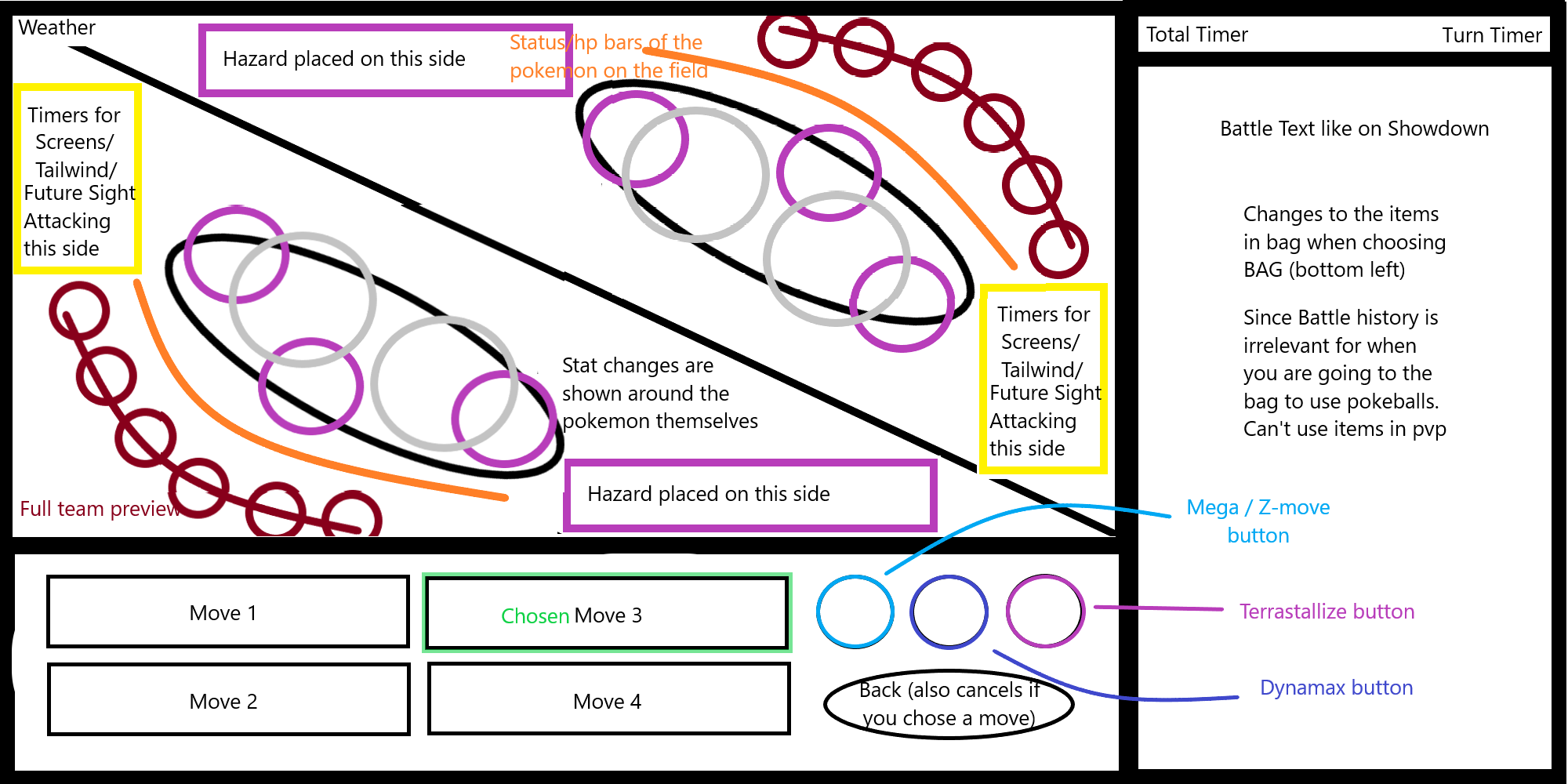
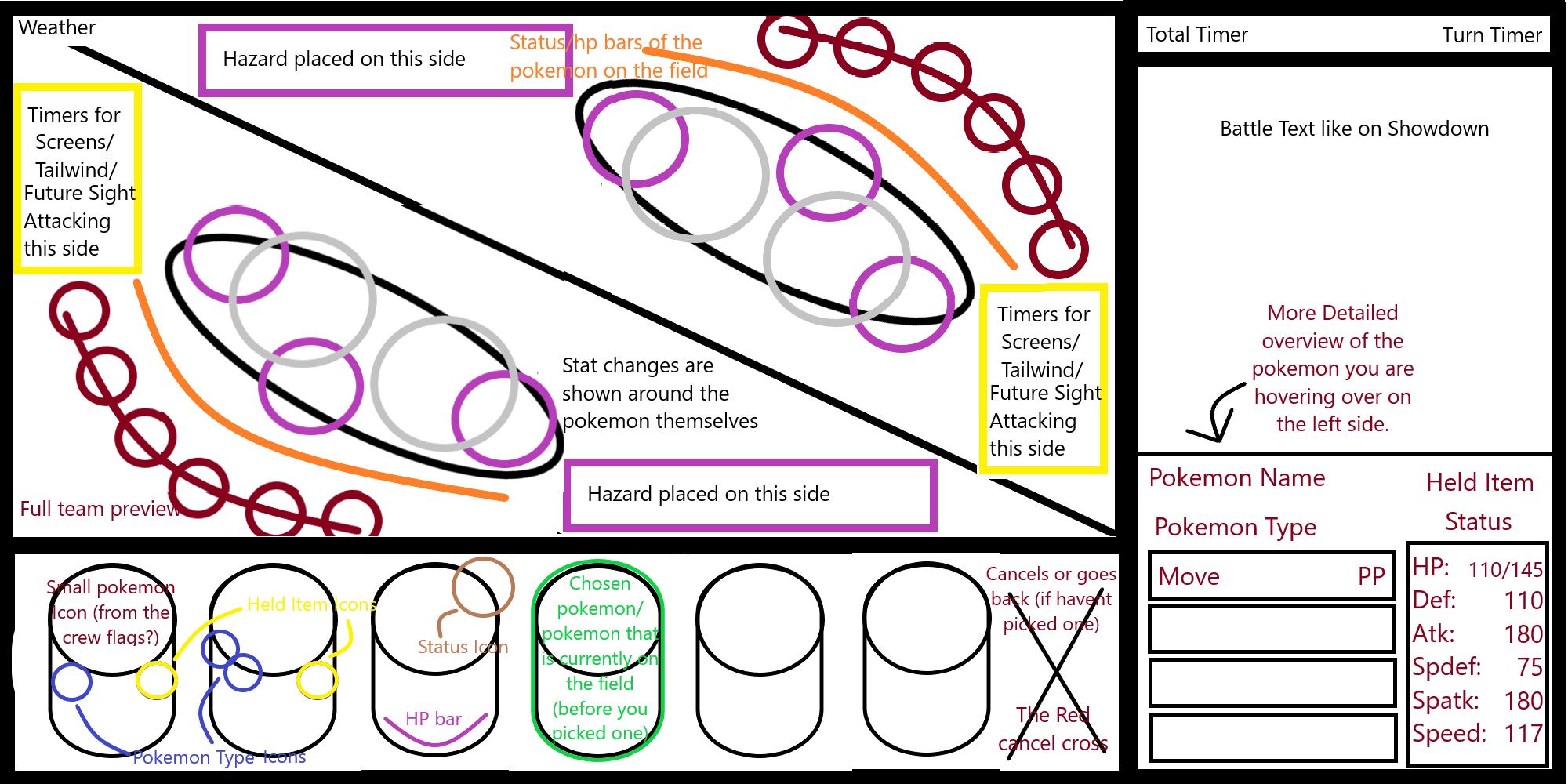
Descriptions/comments are on the images for explanation.

Colors of the layout and the text/segments to be made in whatever preferred, orange/red - or what not.

Have a look!
 

Attachments

  • PBO UI EeveeSenpai - Total description-min.png
    PBO UI EeveeSenpai - Total description-min.png
    114.7 KB · Views: 1,439
  • PBO UI EeveeSenpai - Chosen pokemon-min.png
    PBO UI EeveeSenpai - Chosen pokemon-min.png
    112.4 KB · Views: 1,441
  • PBO UI EeveeSenpai.jpg
    PBO UI EeveeSenpai.jpg
    74.2 KB · Views: 1,423
Olá, prezada equipe do Pokémon Blaze Online!
Quando lançaram esse evento, eu pensei: "Essa é minha oportunidade de ajudar um servidor de jogo Pokémon a melhorar." Obrigado a todos vocês pela dedicação para tornar o PBO um dos melhores da categoria!
Aqui está meu modelo de interface de batalha Pokémon!
Explicação por etapas das mecânicas:

Criei essa interface para ser a mais simples possível, com características dos jogos nostálgicos do GBA "Que todos nós gostamos muito!"
Quando começar uma batalha Pokémon, o jogador terá na (tela de campo) e nos cantos de baixo e direito interfaces de escolher as ações que deseja realizar, a visualização de seu Pokémon e do inimigo. Também na "Tela de Campo" está informando diversas coisas, como: clima ambiente, horas, local do combate, níveis de cada Pokémon em campo, nomes dos treinadores, etc. Uma coisa que eu queria muito incluir, "mas que não fiz porque já estava extremamente difícil fazer essa interface no Paint!"...; como sugestão , acho que pode ser interessante se colocarem ícones de perfil dos jogadores (os personagem do jogo).
Continuando, jogador tem acesso a duas interfaces que se localizam uma ao lado direito e outra abaixo da tela de campo , a interface do lado direito mudará para outras interfaces de movimentos de luta, itens de recursos ou Pokémons reserva, ela mudará dependendo da escolha do jogador sobre os ícones da interface de baixo. "É bem simples, né?".
Minha interface, apesar de simples, foi criada para comportar todas as funções planejadas pelos administradores do PBO:
A UI redesenhar a deve aderir aos atributos padrão da Batalha.
Deve fornecer espaço suficiente para batalhas 2v2 e 3v3, pois há uma grande probabilidade de termos tais batalhas após a integração do Showdown.
A UI deve incorporar botões para Mega Evoluções, Z-Moves e Cancelamento de Movimento (observe que a funcionalidade de cancelamento não está operacional no momento, mas será implementada após o Showdown).
Deve incluir indicadores para aumento de estatísticas, efeitos de status, condições climáticas e todos os outros elementos necessários para uma interface de batalha abrangente.
Mas, acredito que ainda podem aprimorar esse meu modelo de interface e torná-lo ainda mais atraente e intuitivo, acredito que as cores e o tempo de escolha inserido na parte da aba de movimentos seriam muito interessante altera-los, pois nas minha capacidades, eu apenas usei os recursos limitados do Paint e também não tenho experiência nessa área!
Obrigado por lerem até aqui, desejo sucesso contínuo ao jogo PBO!
 

Attachments

  • Modelo de Interface de Combate (Wesley Almeida).png
    Modelo de Interface de Combate (Wesley Almeida).png
    143.6 KB · Views: 1,414
Hi Everyone,
At first, the first thing that i can not send image in here because i click the icon " Image " , It is not actived
So i will show my Battle UI in youtube
Hope you can see this by link: https://www.youtube.com/watch?v=tY64ZMjGHEE
Don't worry it is not a Virus Link :lol:
In My UI battle:
I also make the status pokemon incude poison, burn, paralysed. All of that is put next in each pokemon's name
Mega evolution and Dynamax form is put same as pokemon' status
Each pokemon have 4 moves so i make it attracted by adding type pokemon in the pokemon's move. Maybe there are some new people don't know the type of each Move
Mega evolution, Z Move and Dynamax i separate and decorate them one way balance
The arrow is show on Gengar, that is the turn gengar choose the move to fight
Finally, The icon Fight, Pokemon Switch, Bag and run i alternate it by Icon. It help we don be confuse with many text in Battle.
Thanks for seeing my Battle UI :lol:
RRUM
 

Attachments

  • z4722821552258_65e61b7444c8539c40bf3c40f8a2c008.jpg
    z4722821552258_65e61b7444c8539c40bf3c40f8a2c008.jpg
    184.9 KB · Views: 812
The battle starts on this screen:

dc361aeba0fb1061b02f52bb939c7b14.png


You can already see what happens when clicking bag (battle chat changes to bag resulting into similar to what we have now)

If you click Move Button, screen turns into:

c5fceb273c175d54a44d0a04f25436d2.png


If you pick switch button (switching to other pokemon from team):

ee52c862bb49055dd9bec73e1b49c05e.png


If I end up having the time, I'll remake it with some added in icons & pokemon already. Kind of feels messy cuz of the amount of explanation i did on the pictures.


EDIT: Apparently the BB code isn't working & dont see a way to add attachments like the previous entries have :S
 
Namaskar,

Explaination: 1. So basically, in the 1st Image, you can see a X icon on the move "Moonblast". This is the Cancel button and it will appear only when the move is being clicked by the user. Like if the user used move "Protect" , the X icon will appear on the move "Protect". "Player 1" & "Player 2 gonna be User Name & Opponent Name respectively.Battle Log gonna be Big as i marked (or you can change upto you).

IMG_20230922_183245.jpg


2. In the 2nd Image, A Floating Window will appear when tap on Bag.(You can also use the Battle Log area if you dont like Floating Window idea.

IMG_20230922_183225.jpg


3. In the 3rd Image, Switching between Pokemons are gonna look like this.

IMG_20230922_182915.jpg


Or​

4. Here's another way of switching with Floating Window.

IMG_20230922_183022.jpg


Btw, if you dont like that PBO logo, you can just remove it. And you can put Battle Timer anywhere you see it fit.


I made two models (2 images).
The first is for battles against trainers and NPCs in general.

Image 1.
ggBrA.jpg


______________________________________________________________________________________________________


The second is for wild pokemons, with increased quality of life, quick access to items,
where pokeballs are already visible without the need to click on 'bag'.
one thing or another can be adjusted.

Image 2.
ggBrB.jpg


Subtitle

. On the side of the 'dragon dance' movement, there is a dot icon with an X, this icon will be used to cancel the movement.
. The little arrow (/\ in image 1, on top of the bag, it opens a pop-up, with the items in the bag. which will be on top of the logs/chat)

. Note 1: As I did in praint, it was difficult to adjust and redo some parts. like the 'dragonite' buff, which should be below his hp bar. Or the level of mega alakazam, which ended up not being able to be placed.
. Note 2: I thought about 'mobile' players, so I tried to work on the design horizontally and less vertically.


______________________________________________________________________________________________________


Image 3. Update
ggBrc.jpg

. With pokemons displayed next to the nick (I had forgotten)

 
Status
Not open for further replies.
Back
Top